" ශ්‍රී ලාංකීය අභිමානය " ශ්‍රී ලංකාවේ කොල්ලො කෙල්ලොන්ට 2023 සිරාම බ්ලොග් එක.. Blog Eka.. ப்லொக் எக.. "ALLSRILANKANS BLOG"

This is default featured slide 1 title

Go to Blogger edit html and find these sentences.Now replace these sentences with your own descriptions.

This is default featured slide 2 title

Go to Blogger edit html and find these sentences.Now replace these sentences with your own descriptions.

This is default featured slide 3 title

Go to Blogger edit html and find these sentences.Now replace these sentences with your own descriptions.

This is default featured slide 4 title

Go to Blogger edit html and find these sentences.Now replace these sentences with your own descriptions.

This is default featured slide 5 title

Go to Blogger edit html and find these sentences.Now replace these sentences with your own descriptions.

Tuesday, July 28, 2015

මොනවද?මේ 3G සහ 4G කියන්නේ...


3G ගැන පොඩි සාරාංශයක්

මුලින්ම කියන්න ඕන මේ 3G 4G හී "G" අක්ෂරයෙන් කියවෙන්නෙ "Genation" නොහොත් පරම්පරාවටයි. රැහැන් රහිත හඬ දුරකතන, ජංගම අන්තර්ජාල ප්රවේශය රැහැන් රහිත ස්ථාවර අන්තර්ජාල ප්රවේශ, වීඩියෝ ඇමතුම් හා ජංගම රූපවාහිනි ආදීයන් සදාහා 3G තාක්ෂණය යොදාගෙන තිබෙනවා.(තවමත් යොදාගැනේ.) 3G network එක්ක සාමාන්‍යයෙන් දුරකතන සේවා සැපයුම් කරුමත රදාපවතින තප්පරයකට මෙගා බයිට් 200 ක වේගයකින් සමන්විත වෙනවා (200MBPS).(අවාසනාවකට ලංකාවේ අපිටනම් 4G තාක්ෂණයෙන්වත් මේ තරම වේගයක් ගනන් බැරි එක.) පසුව 3.5G 3.75G ලෙසත් මේ තුන්වන පරම්පරාව යාවත්කාලීන උනා. පලමු 3G ජාලය ලෝකයට හදුන්වලා දීලා තියෙන්නෙ වර්ශ 1998 දී. 

3G වල අතීතය....

3G තාක්ෂණය බිහිඋනේ  1980 දී පමන  ජාත්යන්තර විදුලි සංදේශ සංගමය (ITU) විසින් සිදුකරනු ලැබූ පරේක්ශන වල ප්‍රතිඵලයක් ලෙස. මේ වන විට 3G තාක්ශනය වසර 15ක පමන සිට වැඩි දියුනු වෙමින් පවතී. මුලින්ම 3G හදුන්වලා තියෙන්නෙ IMT-2000කියලා. 3G වෙනුවෙන් වර්නාවලියෙ 3MHz සිට 400MHz දක්වා පරාසයක් දක්වා වෙන්කරලා තියෙනවා..  ලෝකයේ පලමු වානිජමය 3g ජාලය වන්නේ ජපානයේ NTT DoCoMo ලෙසයි. පලමු වානිජ 3g ජාලය ආරම්බ කරන ලද සමාගම වන්නේ FOMA ආයතනයි.එක ආරම්භ කරේ 2001 ඔක්තෝබර් 1 දින වේ. තවද එම ආයතනය විසින් 3G තාක්ෂණයේ වැඩි දියුනුව සදහා (වේගය වැඩි කිරීමට ) WCDMA අංගය එකතු කරන ලදී.

4G ගැන කෙටියෙන්....

4G කියලා කෙටියෙන් හදුන්වලා තියෙන්නෙ "4 generation " හෙවත් සිව්වන පරම්පරාව කියන එක. 4G තාක්ශනය මුලිනම පටන් අරගෙන තියෙන්නෙ 2009 වර්ෂයේ ස්වීඩනයේ. සාමාන්‍යයෙන් දැනට ලෝකයේ පවතින වේගවත්ම 4G ජාලයේ 1GBs එකක පමන වේගයක් පවතින බව තමයි සදහන් වෙන්නෙ.

5G ගැන ....

5G එකත් ඔන්න ළඟදීම අපේ අතට එනවලු. මේ අවුරුද්දේ අග හො ඊළඟ අවුරුද්දේ අනිවාර්යෙන්ම. වේගය  100 MBPS.

එහෙනම් ඔන්න අපි ගියා ආයෙමත් ඉක්මනින්ම හමු වෙමු. 
Share:

Monday, July 27, 2015

අන්තර්ජාලෙයේ අලුත්ම එක - Web Browser -

ඔන්න යාලුවනේ මම අද ආයෙමත් ආවේ ඔයාලට අලුත්ම අලුත් වැඩ කෑල්ලක් හොයාගෙන. මෙන්න මේකයි අද මම ඔයාලට අලුත්ම අලුත් මේ දවස් වල හිට්ම වෙබ් අත්රික්සුව ගැන කියන්නයි යන්නේ . මේක නමින් සිට්‍රියෝ. 

මෙහෙමයි අපි හැමෝම වගේ බ්‍රව්සර් කිව්වොත් ක්‍රෝම් හරි ෆයෆොක්ස් හරිනේ අපි ටිකක් වෙනස් වෙමු නේද දැන් මේ මම අද දෙන බ්‍රව්සර් එක අර දෙකටම වඩා වේගවත්. අනික තමයි ආරක්ෂාව අතිනුත් ඉහලයි. මේකත් ක්‍රෝම් වර්ගයේම Browser එකක් නිසා ඇප්ස් එහෙමත් ගොඩාක් තියනවා.


මේවට අමතරව මේකේ තියන විශේෂම දේවල් තමයි, මේකත් අන්තර්ජාලයෙ අපේ ආරක්ෂාවට Proxy Manager එකක් තිබීම. මතකනේ අර හොරෙන් Internet යන විදිය.

ඒ වගේම    තමයි ඔයාලා Torrents භාගත කරනවානම් ආයේ වෙන වෙන සොෆ්ට් කෑලි ඕනේ නෑ ඒකත් මේකෙන්ම කරන්න පුළුවන්. Torrents Manager.

ඒ වගේම වඩා වේගවත් Download Manager එකකුත් තියනවා පට්ටයි නේ. එහෙනම් ඔන්න ඩවුන් කර ගන්නකො.


එහෙනම් මෙන්න තවත් විස්තර මෙතන තියනවා.

Citrio is a new generation browser developed by Catalina Group Ltd. Initially released in 2013, Citrio continues to gain popularity among users due to its broad functionality and efficiency. Based on the Chromium open source project, the Citrio browser has all the basic functionality of the Chrome platform, complemented by a wide range of integrated add-ons: a download manager, proxy manager, torrent manager etc. Citrio’s built-in malware and phishing protection provides complete security and safety of use.

At Citrio, we apply the highest standards of quality to everything we do. With our dedicated team of experienced developers, QA specialists, and designers, we run and control the whole software development process. This allows us to release regular updates of our software, add new features, and communicate with our users.


Share:

IP වෙනස් කර කර හොර වැඩ කරන්න ඕනෙම නෑ දැන්. Anonymity Online.


ඔන්න යාලුවනේ මම ආයෙමත් අවේ අලුත්ම වැඩක් හොයාගෙන. උඩ තියන ටොපික් එකේ හැටියටම. අන්තරජාලයේ මොකක් හරි හොර වැඩක් කරන්න ගියාම තමයි අපිට IP එක මතක් වෙන්නේ නේද. ඔන්න මම අද දෙන්න යන්නේ පට්ට වෙබ් අත්රික්සුවක් (WEB BROWSER) මේක මෙහෙමයි මම පල්ලෙහා දීලා තියන් ලින්ක් එකෙන් ගිහින් ඩවුන් කරගෙන මුලින්ම සෙටප් කර ගන්න. මෙයාලගේ තව සොෆ්ට් කෑලි තියනවා ඒවත් ෆලෝ කරලා බලන්නකෝ.

මේකෙදි අපි ආයේ අලුත් සොෆ්ට් දාලා IP වෙනස් කරන්න ඕනේ නෑ PROXYගානේ වේලෙන්න ඕනේ නෑ . එය ඉබේම අපේ IP එක හංගලා හොරෙක් විදියට තමයි අන්තර්ජාලයට සම්බන්ද වෙන්නේ . පට්ටයි නේ . මෙන්න තවත් විස්තර පල්ලෙහා තියනවා. එහෙනම් අපි ගියා . ආයෙමත් අලුත් එකෙකින් හමු වෙමු.


මෙන්න වැඩි විස්තර,

What is Tor?
Tor is free software and an open network that helps you defend against traffic analysis, a form of network surveillance that threatens personal freedom and privacy, confidential business activities and relationships, and state security.

Why Anonymity Matters

Tor protects you by bouncing your communications around a distributed network of relays run by volunteers all around the world: it prevents somebody watching your Internet connection from learning what sites you visit, and it prevents the sites you visit from learning your physical location.


Share:

Sunday, July 26, 2015

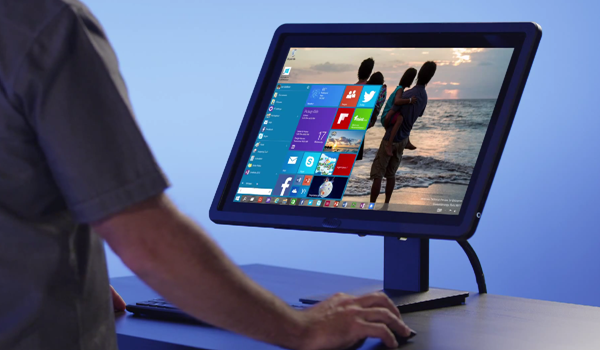
මෙන්න Windows 10 ගැන සේරම විස්තර ආව ගමන් දා ගන්න විදිය උණු උණු ඒවා ආ ..


ඔන්න යාලුවනේ මන් දැන් අවේ ඔයාලට ගොඩාක් වටිනා කියන දේවල් ටිකක් හොයාගෙන කියන්න යන්නේ Windows 10 ගැන. හරි එහෙනම් අපි බලමූ මොනවද මේ විස්තර කියලා. ඔන්න 2015 අවුරුද්දේ මේ මාසේ ඒ කියන්නේ ජුලි මාසයේ 29 වැනිදා  Windows 10 අපිට ගන්න පුළුවන්.

මුලින්ම ඔබට Windows 10 දා ගන්න පුළුවන් මැෂින් එකක් තියනවාද බලන්න .....

If you’re installing for the first time on your PC, before downloading Windows 10 ISO 64-bit or 32-bit, you might want to know the minimum hardware requirements for Windows 10.


Windows 10 system requirements .....
Processor:-1 GHz or faster
RAM:- Minimum of 1 GB for 32-bit, 2 GB for 64-bit
Hard Disk Space: 16 GB for 32-bit, 20 GB for 64-bit
Graphics Card: DirectX 9 or later with WDDM 1.0 driver
Display: 800×600 resolution

දැන්  ඔබටත Windows 10 නොමිලේ ලබාගත හැකිදැයි මෙතනින් බලාගන්න .....


ඔයාට මෙතනින් Free ගන්න බැරිනම් ඔයාට Home Edition එක ඩොලර් 119.99 කට ද , Pro Version 1 ඩොලර් 199.99 කට ද ගන්න වෙනවා.
එහෙම අරගෙන මෙන්න මේ SERIAL NUMBER පාවිච්චි කරන්න .....

Product key to install Windows 10 .....
When you’re asked to enter a product key, please enter one of the following keys depending on the edition of Windows 10 you’re installing or activating.

Windows 10 Home: KTNPV-KTRK4-3RRR8-39X6W-W44T3
Windows 10 Pro: 8N67H-M3CY9-QT7C4-2TR7M-TXYCV
Windows 10 Enterprise: CKFK9-QNGF2-D34FM-99QX2-8XC4K

These product keys can be used to activate all preview builds of Windows 10 that are officially released by Microsoft, which also means that the key might not work on leaked Windows 10 builds!

Windows 10 ගන්න ඔයාට සුදුසු කම තියනවානම් මෙන්න මේ විදියට අපේ Task bar එකේ ලෝගෝ එකක් පෙන්නනවා.....


සුදුසු කම් තිබිලත් මෙහෙම එකක් නැද්ද? එහෙනම් මෙහෙම කරන්න.

මුලින්ම මේක කියන්න ඕනේ ඔයාට නොමිලේ Windows 10 ගන්න ඕනෙනම් ඔයාගේ දැනට තියන මෙහෙයුම් පද්දතිය ORIGINAL වෙන්න ඕනේ. හා හා බය වෙන්න එපා CRACK එක ඔරිජිනල් නම් කිසි අව්ලක් නෑ මගේ එකත් හොර කොපියක් ඒත් වැඩේ හරි ගියා. ඊළගට WINDOWS AUTO UPDATE ON කරලා. අප්ඩේට් කරන තියන් ඉන්න ඕනේ. ඉතින් මේ කිව්වා දේවල් ඔයා දැනටමත් කරලා නම් අනිවාර්යෙන්ම ඔයාගේ මැෂින් එකේ ඇර ලෝගෝ එක තියනවා.

එහම් නැත්තම් මෙන්න මේ අප්ඩේට් එක ඩවුන් කරගෙන දා ගන්න . වැඩේ හරියයි..


මෙන්න තවත් විස්තර .. Step by Step ......

Note: You will need to have a genuinely activated copy of Windows 7/8.1 to reserve your free Windows 10 copy.

Step 1: If you’re on Windows 7, then it’s necessary that you have Service Pack 1 installed – download from Windows Update. If you’re running Windows 8, then you should have the latest 8.1 update installed, which can also be grabbed from Windows Update. Secondly, you should have the March update, labelled as KB3035583, installed on your PC as well. You can download the update directly from here.

Note: If you have Automatic Updates enabled on your PC, then it’s highly likely that you have the March update installed already. If not, then grab the update from the link which we have provided above.

Step 2: In the lower right corner of the Windows system tray, after installing the March update, you should be seeing a new Windows icon prompting you to ‘Get Windows 10.’ Click on it. Refer to the screenshot below for more details on what it looks like.

Windows 10 update prompt

Step 3: Once you’ve clicked on the prompt, you’ll be greeted with a bunch of screens on how Microsoft plans to get Windows 10 to Windows 7 and 8.1 users for free. Go through the screens till you reach the last one asking for your email address.

Step 4: Enter your email address. Make sure this is a valid and a working one because this is where you’ll be sent a confirmation email regarding your interest in Windows 10.

Step 5: With the email address entered, hit the ‘Send confirmation’ button and you’re done.

Now when Windows 10 is out in July, it will automatically download for you in the background.

ඕනේ නම් අපිට ඉල්ලපු එක කැන්සල් කර ගන්නත් පුළුවන් එහෙම ඕනේ නම් මෙහෙම කරන්න.....

Want to cancel your Windows 10 reservation? Here’s how you can do that as well:

Step 1: Click on the Windows icon in the system tray.

Step 2: Now click on the three horizontal lines on the top left hand-side corner.

Step 3: You’ll be presented with a bunch of options. Click on ‘Cancel Reservation.’

Step 4: Now simply confirm your choice and your Windows 10 reservation will be cancelled.


ඔන්න ඔහෙන් මෙහෙන් කොහොම හරි දාගත්තම මෙන්න මේ දේවල් අපිට ලැබෙනවා .....


Windows 10 features  .....
For the uninitiated, following are the highlights of Windows 10 operating system:
# New Start menu
# Virtual desktop
# Digital personal assistant Cortana
# Continnum feature to automatically switch between PC and tablet modes
# Microsoft Edge (new web browser)
Note that, in addition to above mentioned features, there are hundreds of features to make your computing experience better.

මෙන්න මේ වීඩියෝ කට්ට බලන්නකෝ කොහොමද කියලා .....


එහෙනම් ඔන්න අපි ගියා ආයෙමත් අලුත් දෙයකින් ඉක්මනින්ම හමු වෙමු. කට්ටියටම බායි. ආ ....


Share:

හැම දේම ස්මාර්ට් වෙන කාලේ මෙන්න ස්කුටියත් ස්මාර්ට් වෙලා - Smartscooters -

ඔන්න යාලුවනේ මම අද ආවේ අලුත්ම ට්‍රෙන්ඩ් එක වෙන ස්මාර්ට් කලාවේ අලුත්ම එක ස්මාර්ක් ස්කූටර්ස් ගැන කියන්න. මෙන්න තියනවා විස්තරය කියවලා බලන්නකෝ.

After raising $150 million dollars and operating in secrecy for three years, Gogoro finally told the world what they’re building: a smart electric scooter and a charging infrastructure to go with it.

Tomorrow, the first Gogoro smartscooters will ship out to pre-order customers living in the company’s first flagship city, Taipei.

Gogoro started taking pre-orders last month at a price of NTD$128,000, or roughly $4,140 US dollars. That’s about double what you’d pay for a higher end gas scooter, though Gogoro claims that government subsidies and gas savings will cover the differences within two years of ownership.


For those who might’ve missed our original post and just want the gist, Gogoro has three key components: they’re building the aforementioned electric scooter with all sorts of smarts, a smart lithium-ion battery to power it, and a network of “GoStations” where you can swap the battery on the fly for one with more juice. It was founded back in 2011 by the former Chief Innovation Officer of HTC, Horace Luke, with significant investment from HTC co-founder (and now HTC CEO) Cher Wang.

One key aspect of Gogoro’s gameplan has been met with some degree of resistance: unlike many electric vehicles — like, say, a Tesla — you can’t charge the Gogoro smartscooter at home. If your scooter needs more juice, you’ll need to cruise to one of the GoStations and swap out your battery.


The company tells me that they’ve had “400+” pre-orders to date, with 65 GoStations currently up and running in Taipei.

හරි ඔන්න එහෙනම් අපි ගියා . යේ අලුත් දේකින් මේ වගේම ඉක්මනින්ම හමු වෙමු.


Share:

අපේ ලිපි කෙලින්ම Email එකට

Enter your email address:

Delivered by FeedBurner


මුහුණ පොතේ අපි

පැමිණ ගිය අය

අපේ යාලුවෝ