" ශ්‍රී ලාංකීය අභිමානය " ශ්‍රී ලංකාවේ කොල්ලො කෙල්ලොන්ට 2023 සිරාම බ්ලොග් එක.. Blog Eka.. ப்லொக் எக.. "ALLSRILANKANS BLOG"

This is default featured slide 1 title

Go to Blogger edit html and find these sentences.Now replace these sentences with your own descriptions.

This is default featured slide 2 title

Go to Blogger edit html and find these sentences.Now replace these sentences with your own descriptions.

This is default featured slide 3 title

Go to Blogger edit html and find these sentences.Now replace these sentences with your own descriptions.

This is default featured slide 4 title

Go to Blogger edit html and find these sentences.Now replace these sentences with your own descriptions.

This is default featured slide 5 title

Go to Blogger edit html and find these sentences.Now replace these sentences with your own descriptions.

Showing posts with label special. Show all posts

Thursday, April 6, 2017

කප්පම් ඉල්ලන මෘදුකාංග – Ransomware


තොරතුරු තාක්ෂණයේ  දියුණුවත්  එක්ක ලෝකයේ  බොහෝ ක්ෂේත්‍ර පරිගණක සහ අන්තර්ජාලය තමන්ගේ වැඩ කටයුතු  සඳහා යොදාගන්න පුරුදු වුණා. අපේ වැඩ පහසු කරන මෘදුකාංග හදන මෘදුකාංග නිර්මාණකරුවන් වගේම අපරාධකරුවනුත් මේ තාක්ෂණික දියුණුව තමන්ගේ මඩිය තර කරගන්න යොදාගැනීම හරහා මෑතකදී  බිහිවුණු ප්‍රවණතාවක් ගැන තමයි අද ලිපියෙන් කතා කරන්නේ.

මෘදුකාංග කොහොමද කප්පම් ඉල්ලන්නේ?

කප්පම් ඉල්ලීම සඳහා භාවිතා කරන මෘදුකාංග විශේෂය හැඳින්වෙන්නේ ransomware කියලයි. බොහෝවිට මේවා නිර්මාණය වෙන්නේ තමන්ගේ හැකියාවන් අපරාධ සඳහා යොදාගන්න පුරුදු වුණ දක්ෂ  ක්‍රමලේඛණ ශිල්පීන් අතින්. ඔබේ පරිගණකය හෝ ස්මාර්ට් දුරකථනය තුළ  ransomware එකක් ස්ථාපනය වූ පසු එම මෘදුකාංගයට පුළුවන් ඔබේ දත්ත ඔබට පාවිච්චි කරන්න බැරි වෙන ආකාරයට ගුප්ත කේතනය (encrypt) කරන්න, නැතිනම් ඔබේ පරිගණකය හෝ දුරකථනය අගුළු දැමීම. ඊළඟට ඔබේ දත්ත නැවත විකේතනය (decrypt) කරන්න හෝ අන්ලොක් කරන්න  නම් ඔබ යම්කිසි මුදලක් අන්තර්ජාලය හරහා ගෙවිය යුතු බවට දැනුම්දීමක් මේ මෘදුකාංග මගින් සිදුවෙනවා.
Ransomware එකක් මගින් කප්පම් ඉල්ලා කෙරෙන දැනුම්දීමක් (www.cureyoursystem.com)

Ransomware වල ඉතිහාසය

Ransomware හිසරදයක් වෙන්න පටන්ගත්තේ 2005දී පමණ නමුත් ransomware වල ඉතිහාසය 80 දශකය දක්වා විහිදෙනවා. 1989 වසරේදී  AIDS Trojan නමින් හැඳින්වුණ ransomware එකක් පරිගණක වලට මුදාහැරුණත් පුද්ගලික පරිගණක ඒ වකවානුව තුළ ඉතා දුලබ වීම නිසා එය  එතරම් අවධානයට ලක් වුණේ නෑ. වසර 2005 පමණ වනවිට නැවත වතාවක් රුසියාව ආශ්‍රිතව මේ මෘදුකාංග දකින්න ලැබෙන්නේ යුක්රේනය, බෙලරුස් සහ කසකස්ථාන් වැනි රුසියාව ආසන්නයේ  රටවල් වල පිරිස් අපහසුතාවයට පත් කරමින්.
2010 පමණ වනවිට මේ ransomware අන්තර්ජාතිකව පරිගණක ආරක්ෂාව සම්බන්ධ තර්ජනයක් හැටියට හඳුනාගැනෙනවා. ගුප්ත කේතන උපක්‍රම භාවිතා කරන පළමු ransomware එක 2013 දී අන්තර්ජාලයට මුදාහැරෙනවා. කාලයත් සමග අද වනවිට ඉතා දියුණු තාක්ෂණික උපක්‍රම මගින් වඩාත් දරුණු ransomware නිපදවන්න වගේම සංවිධානාත්මක මාෆියාවක් විදියට මේ මෘදුකාංග බෙදාහැරින්නත් සයිබර් අපරාධකරුවන් පුරුදු වෙලා තියනවා. නවතම සංඛ්‍යාලේඛන වලට අනුව දිනකට ලොව පුරා පරිගණක 4000ක් පමණ ransomware වල ගොදුරු බවට පත්වෙනවා.
ransomwareවල සීඝ්‍ර වර්ධනය (source : symnatic )

Ransomware වල ප්‍රභේද 2ක් තියනවා

1- Locker Ransomware
මේ වර්ගයේ ransomware වලින්  කරන්නේ ඔබේ පරිගණකය අගුළු දමා නැවත ඔබේ පරිගණකයට පිවිසීමට අවසර ලබාදීම වෙනුවෙන් කප්පම් ඉල්ලන එක. මේ මගින් ඔබේ පරිගණකයේ දත්ත වලට බලපෑමක් නොකෙරෙන නිසා සාපේක්ෂව මේ වර්ගයේ ransomware වලින් සිදුවියහැකි හානිය අඩුයි.
2- Crypto Ransomware
මේ වර්ගයේ ransomware මගින් ඔබේ දත්ත ඔබට පාවිච්චි කරන්න බැරි ආකාරයට ගුප්ත කේතනය (encrypt) කරන නිසා මේ වර්ගයේ එකකින් ඔබේ දත්ත ආරක්ෂා කරගැනීමේ හැකියාවක් නැති තරම්.
ransomware වර්ග (www.symantec.com)

ගුප්ත කේතනය (Encryption) සහ Ransomware

ගුප්ත කේතනය කියන්නේ පරිගණක වල ආරක්ෂාව වැඩි කිරීම සඳහා පාවිච්චි කෙරෙන  තාක්ෂණයක්. අපි පරිගණක ජාලයක් හරහා යවන පණිවුඩ, නැතිනම් පරිගණකයක ගබඩා කරන තොරතුරු වෙනත් කෙනෙකුට කියවන්න බැරි වෙන විදියේ රහස් සංකේත බවට පත්කිරීම තමයි ගුප්ත කේතනය හරහා සිදුවෙන්නේ. මේ විදියට කේතනය කළ තොරතුරු විකේතනය කරන්න නම් ඒ සඳහා සැකසු ඩිජිටල් යතුරක් (digital key) අවශ්‍යයි. ගුප්ත කේතනය කළ තොරතුරු නැවත විකේතනය කරන්න හැකියාව තියෙන්නේ අදාළ යතුර තියන කෙනෙකුට පමණයි.
Crypto Ransomware මගින් කරන්නේ පරිගණකයේ දත්ත ගුප්ත කේතනය කර එම දත්ත විකේතනය කිරීම සඳහා අවශ්‍ය ඩිජිටල් යතුර ලබාදීම වෙනුවෙන් කප්පම් ඉල්ලීමයි. නවීන ගුප්ත කේතන ක්‍රම වලින් කේතනය කරන යතුරක් නැතිව විකේතනය කිරීම කළ නොහැක්කක් හැටියට තමයි සැලකෙන්නේ. උදාහරණක් හැටියට දැනට වෙබ් අඩවි සඳහා පාවිච්චි වෙන AES-128 නමැති ගුප්ත කේතන ක්‍රමය මගින් කේතනය කළ දත්ත යතුරක් නැතිව විකේතනය (bruteforce) කරන්න සුපිරි පරිගණකයකටත් (supercomputer) වසර බිලියන 13ක් පමණ ගතවන බව කියවෙනවා. ඒ නිසා Crypto Ransomware එකක ගොදුරක් වෙන කෙනෙකුට තමන්ගේ දත්ත අහිමි වෙන්න තියන ඉඩකඩ ඉතා ඉහළයි.

Ransomware පැතිරෙන්නේ කොහොමද?

ප්‍රධාන වශයෙන් මේවා පැතිරෙන්නේ ඊමේල් සමඟ එන ඇමුණුම් (attachments) හෝ ලින්ක් හරහා යි. ඔබට නාඳුනන කෙනෙකුගෙන් එන ඊමේල් එකක් සමග තියන ගොනුවක් ඔබ විවෘත කිරීමේදී ඔබේ පරිගණකයට ransomware ඇතුළු වෙන්න ඉඩ තියනවා. ඒ වගේම ඔබ සැරිසරන වෙබ් අඩවි වලත් ransomware තියෙන්න පුළුවන්. ඒ නිසා  ඔබ නිතර පාවිච්චි නොකරන වෙබ් අඩවි වලින් ඩවුන්ලෝඩ් කරන දේවල් ගැන සැලකිලිමත් ඉතා වැදගත්.

ජංගම දුරකථන සඳහා ransomware

වසර 2014 දී ඇන්ඩ්‍රොයිඩ් මෙහෙයුම් පද්ධතිය සඳහා පළමු ransomware එක වාර්තා වීමත්  පරිගණක වලට සීමා නොවී ජංගම දුරකථන වලටත් පැතිරෙන්න ransomware සමත් වෙලා තියනවා. දුරකථන සඳහා වන ransomware බොහොමයක් තියෙන්නේ නිල නොවන app store වල. ඒ වගේම සමහර ransomware ප්‍රති වයිරස මෘදුකාංග විදියට වෙස් මාරු කරගෙන ඉන්න අවස්ථාත් පසුගිය දෙවසර තුල වාර්තා වෙලා තියනවා.
ජංගම දුරකථන වලට එන කප්පම් ඉල්ලීම් (www.welivesecurity.com)

Ransomware වල බලපෑම

Ransomware වලින් වෙන්න පුළුවන් ලොකුම හානිය තමයි තමන්ගේ දත්ත අහිමි වීම. ඔබ වසර ගණනක් තිස්සේ එකතු කරගත් ඡායාරුප, නැතිනම් තමන්ගේ රැකියාවට අදාළ තොරතුරු ගොනු වගේ දේවල් ransomware නිසා ඔබට නැතිවෙන්න පුළුවන්. තනි පුද්ගලයෙකුට නම් සමහරවිට මෙහෙම දෙයක් දරාගන්න පුළුවන් නමුත් ආයතනයක කටයුතු වලට යොදාගන්නා පරිගණකයකට  මේ ඇබැද්දිය සිද්ධ වුනොත් ආයතනයට  විශාල පාඩුවක් වගේම අදාළ සේවකයාගේ කීර්තිනාමයටත් හානි සිදුවෙන්න පුළුවන්. මේ වගේ  සිදුවීම් කිහිපයක් පසුගිය වසරේ අපේ රටෙනුත් වාර්තා වෙලා තියනවා.
ඊළඟ කාරණය තමයි ransomware එක මගින් ඔබේ දත්ත සොරාගෙන තියෙන්න ඇති හැකියාව. ඔබේ පරිගණකයේ ඔබට හොරෙන් වැඩ කරන මෘදුකාංගයකට ඔබේ තොරතුරු ගොනු, ඔබ ටයිප් කරන පාස්වර්ඩ් වැනි දේවල් සොරාගෙන වෙනත් කෙනෙකුට යවන්නත්  පුළුවන්.

Ransomware එකකට අහුවුණොත් මොකද කරන්නේ?

1- හැකි ඉක්මණින් පරිගණක ජාල වලින් ඉවත් වෙන්න

ඔබේ පරිගණකය දැනටමත් ransomware එකකට අහුවෙලා නම්, ඔබේ පරිගණක ජාලයේ වෙනත් පරිගණකයකට ransomware එක ඇතුලත් කරන්න එයට හැකියාව තියෙන්න පුළුවන්. ඒ නිසා හැකි ඉක්මනින් අන්තර්ජාලය, WiFi, LAN හෝ වෙනත් ජාලගත සබඳතා වහාම නවත්වන්න.

2- පොලිසියට කියන්න

මේකෙන් ඔබේ දත්ත නැවත ලබාගන්න තියන හැකියාව අඩු ඉතා නමුත් ඔබේ පරිගණකයේ ආයතනික දත්ත වගේ දේවල් තියන අවස්ථාවකදී පොලිස් තොරතුරු තාක්ෂණ අංශයට දැනුම්දීම ඉදිරි කටයුතු වලට පහසුවක් වේවි. ඒ වගේම ආසාදනයට ලක්වුණු පරිගණකය ඔබේ සේවා ස්ථානයේ එකක් නම වහාම ඔබේ සේවා ස්ථානයේ තොරතුරු තාක්ෂණ අංශයට දැනුම් දෙන්න.

3- Ransomware එක අයින් කරගන්න බලන්න

ඔබේ පරිගණකයට අරක්ගත්ත ransomware එක ගුප්ත කේතන පාවිච්චි නොකරන එකක් නම් ඔබේ දත්ත ටික බේරගන්න හැකියාව තියෙන්න පුළුවන්. ඒ සඳහා පළමුවෙන් ඔබට ransomware එකේ නම හොයාගන්න පුළුවන් නම් වෙනත් පරිගණකයකින් අන්තර්ජාලයේ පොඩ්ඩක් හොයලා බලන්න. ඒ ransomware එකට අදාළ විකේතන මෘදුකාංගයක් තියෙන්න පුළුවන්. එහෙම හොයාගන්න නැතිනම් ඔබේ මෙහෙයුම් පද්ධතියේ තියන Safe Mode වැනි පහසුකමක් මගින් හෝ මෙහෙයුම් පද්ධතිය නැවත ස්ථාපනය කිරීම මගින් ransomware එක ඉවත් කරන්න උත්සාහ කරන්න.

4- Backup එකක් restore කරන්න

ඔබ කලින් ගත්තු backup එකක් ඔබ සතුව තියනවනම් ඒක නැවත ස්ථාපනය කරගන්න. ලඟදි කරපු වැඩ ටික ඔබට අහිමි වුණත් වෙලාවේ හැටියට හොඳම විසඳුම තමයි මේක.

5- ගෙවන්න පෙර  සිතා බලන්න

කරන්න වෙන දෙයක් නැතිම වෙලාවක ඉතුරු වෙන එකම විසඳුම තමයි කප්පම ගෙවන එක. නමුත් මේක එතරම් නුවණට හුරු වැඩක් නෙවෙයි. එහෙම කියන්න හේතු කිහිපයක් තියනවා. කප්පම් ගෙවූ පසුවත් ඔවුන් ඔබේ දත්ත නිදහස් නොකරන්න ඉඩ තියනවා. ඒ වගේම ඔබේ දත්ත ලැබුණු පසුවත් ransomware එක ඔබේ පරිගණකයේ ඉතිරි වෙලා තියනවානම් ඔබ තවමත් අනතුරින් ගැලවී නැහැ. තවත් කාරණයක් තමයි ඔබ කප්පම් ගෙවීමෙන් සිදුවෙන්නේ කප්පම්කරුවන් දිරිමත් කිරීමක්. ඒ නිසා කප්පම් නොගෙවා සිටීමට හැකි සෑම උත්සාහයක්ම ගැනීම ඉතා වැදගත්.

Ransomware වලින් බේරෙන්නේ කොහොමද?

ප්‍රති-වයිරස මෘදුකාංග වලට ransomware හඳුනාගන්න තියන හැකියාව තරමක් අඩු නිසා ඒ  පිළිබඳව අපි සැලකිලිමත් වීම අත්‍යවශ්‍යයි. පරිගණක සම්බන්ධ මේ වගේ පුරුදු ටිකක් ඔබේ ජීවිතයට එකතු කරගැනීම ransomware වගේම තවත් බොහෝ අවදානම් තත්ත්ව වලින් ගැලවීමට උදව් වේවි.
  1. පරිගණකය / දුරකථනය නිතර backup කරන්න.
  2. වටිනා ඡායාරූප, ලිපිගොනු ආදිය Google Drive හෝ DropBox වැනි සේවාවක් තුළ තබන්න.
  3. මෘදුකාංග සහ මෙහෙයුම් පද්ධතිය යාවත්කාලීන කරන්න.
  4. ප්‍රති-වයිරස මෘදුකාංගයක් පාවිච්චි කරන්න.
  5. ඔබ ඩවුන්ලෝඩ් කරන ගොනු අදාළ ප්‍රවර්ගයේමද (file type) යන්න විවෘත කිරීමට පෙර පරීක්ෂා කරන්න. උදාහරණයක් හැටියට ගීතයක mp3 ගොනුවක් වෙනුවට exe හෝ apk ගොනුවක් ඩවුන්ලෝඩ් වුණොත් නිසැකවම එය හානිකර හෝ ඔබට අනවශ්‍ය ගොනුවක්.
  6. නොදන්නා වෙබ් අඩවි වලින් ජංගම දුරකථන යෙදුම් (mobile apps) ඩවුන්ලෝඩ් කිරීමෙන් වළකින්න.
  7. Spam හෝ සැක සහිත ඊමේල් පණිවුඩවල අඩංගු ලින්ක් ක්ලික් කිරීමෙන් වලකින්න.
  8. Ad-blocker මෘදුකාංගයක් පාවිච්චි කරන්න.
අවසාන වශයෙන් තොරතුරු තාක්ෂණ ක්ෂේත්‍රයේ නියැලෙන අයට පමණක් සීමා නොවී පරිගණකයක් හෝ ස්මාර්ට් උපකරණයක් පාවිච්චි කරන සහ අන්තර්ජාලය භාවිතා කරන සියළු දෙනාම පරිගණක ආරක්ෂාව ගැන යම් දැනුමක් ලබා සිටීම තමන්ගේ ආරක්ෂාවටත්, පුද්ගලිකත්වය ආරක්ෂා කරගැනීමටත් විශාල පිටුවහලක් වෙයි. ඒ නිසා මේ දේවල් ඔබේ යහළුවන් එක්කත් බෙදාහදා ගන්නත් අමතක කරන්න එපා.
මුලාශ්‍ර: Heimdal Security, ESET Security, Business Insider
කවරයේ පින්තූරය: stinntech.com
Sources:- roar.tech
Share:

Thursday, December 8, 2016

WhatsApp Will Stop Running On These Smartphones In 2017


The company has updated its official blog post that recommended upgrading to a newer Android, iPhone, or Windows Phone version to continue using WhatsApp.

WhatsApp won’t work on these devices after June 30, 2017:

  1. Android 2.1 and Android 2.2
  2. Nokia S40
  3. Nokia Symbian S60
  4. BlackBerry OS and BlackBerry 10
  5. iPhone 3GS/iOS 6
  6. Windows Phone 7


It looks like WhatsApp is taking these steps as these older platforms hinder the growth of the app by not supporting the newer features.

“While these mobile devices have been an important part of our story, they don’t offer the kind of capabilities we need to expand our app’s features in the future,” the company adds in its blog post.
Share:

Wednesday, December 7, 2016

How Your Computer Displays Correct Time When Turned On After Years?


THE RTC CHIP REMEMBERS THE DATE AND TIME.

This timekeeper chip is called the Real-time Clock (RTC) or the CMOS ( Complementary Metal-oxide Semiconductor) chip. The CMOS chip (known as CMOS RAM) is a memory which also stores the BIOS information of the computer. And it is a volatile memory, that’s why It is driven by a low voltage battery having a life of around five to ten years. On desktop computers, the battery looks like a silver colored coin.

The RTC chips come in a compact form, often not user-replaceable, in newer computers including laptops. In fact, the need for such chips in machines is declining as high-speed connectivity is being adopted at a tremendous rate. The computers can easily sync time using the internet. Single board computers like the Raspberry Pi don’t feature a real-time clock chip.

Single board computers like the Raspberry Pi don’t feature a real-time clock chip. Other compact devices mobile phones have the real-time clock built on the chip itself but maybe without a battery in order to save space. The RTC is then powered by the mobile phone’s main battery. That’s the reason the time on your mobile resets when you remove the battery.
Share:

Tuesday, October 25, 2016

Java Is The Most Popular Programming Language


            Programming languages like Java, C, and C++ have stood the test of time and remained widely popular among the programmers. The recent ranking of programming languages shows the same trend.  Newer players like Google’s Go and Apple’s Swift too are rising in the popularity.

Top 20 programming languages

Oct 2016Oct 2015ChangeProgramming LanguageRatingsChange
11Java18.799%-0.74%
22C9.835%-6.35%
33C++5.797%+0.05%
44C#4.367%-0.46%
55Python3.775%-0.74%
68changeJavaScript2.751%+0.46%
76changePHP2.741%+0.18%
87changeVisual Basic .NET2.660%+0.20%
99Perl2.495%+0.25%
1014changeObjective-C2.263%+0.84%
1112changeAssembly language2.232%+0.66%
1215changeSwift2.004%+0.73%
1310changeRuby2.001%+0.18%
1413changeVisual Basic1.987%+0.47%
1511changeDelphi/Object Pascal1.875%+0.24%
1665changeGo1.809%+1.67%
1732changeGroovy1.769%+1.19%
1820changeR1.741%+0.75%
1917changeMATLAB1.619%+0.46%
2018changePL/SQL1.531%+0.46%
Share:

Saturday, October 22, 2016

Ubuntu 17.04 will be called Zesty Zapus


After the recent Ubuntu 16.10 Yakkety Yak release, the Canonical founder Mark Shuttleworth has announced the name of the next major Ubuntu release. Ubuntu 17.04 will be called Zesty Zapus which is named after a jumping mouse found in the North American region.
Share:

Tuesday, June 14, 2016

Basic Linux Commands


we find ourselves pondering over the Basic Linux Commands which one must be aware of, as a beginner!

ls
The ls command is used to list the contents of the directory (just in case you are getting confused: a directory can be considered as being analogous to a folder of Windows). You will be using the ls command to gain information about the files and directories.

As I mentioned above, we can add certain options to a Linux command in order to make it do a little bit of extra work. Here’s is how it happens:

cd [dir]
The ‘cd‘ command is used to change the current directory i.e we use this command to switch over to some other directory whose contents we might want to view or perform particular operations upon. It is basically used for navigation purposes. Using this command changes the current directory to ‘dir’. If you simply use the cd command without specifying the directory, it changes the current directory to the home directory.

pwd
The pwd command is used to display the name of the current working directory. In case you are unaware about it, use the pwd command to determine the directory that you are currently placed in.

cat [file]
The cat command concatenates and display files. This command is used to display the contents of the file mentioned along with the command.

echo [argument]
The echo command is one of the most commonly used Linux commands and is used to display the argument mentioned in the command on the screen. It basically displays a line of text/string on standard output or a file.

clear
Sometimes while using the Terminal, there is a tendency for things to get cluttered. There could be too much information on the screen or you might, no longer require the data being displayed. In such cases,we use the clear command to (no prizes for guessing) clear the screen and get rid of the contents of the screen.

exit
As the name suggests, the exit command is used to exit the shell or your current session.

man command
One of the Linux commands that would come to your rescue when things get sticky is the man command. The man command displays the online manual for the ‘command’ specified along with the word man. It is sort of like the help menu. You can get information about any of the command, its function, the options associated with it etc. By using the man command:

This documentation provided for any Linux command by the man command is called ‘man pages’.

Here are some more Linux commands that you should know:

rm: This command removes files and directories.

cp: This command copies files and directories.

mv: This command moves files and folders between directories.

mkdir: This command makes a new folder in your working directory.

cal: This command shows calendar on you Terminal.

nano: This command is a command line text editor.

sudo: This command gives you the super user privileges.

If you are willing to learn more about Linux command line tools related to various system processes, hardware, users, network etc. here’s a useful cheatsheet.

There are hundreds of Linux commands out there. But, I would advise you to first try out these commands on your own system and gather a basic idea of how they work. You could also refer to the man pages of each command in order to gain more knowledge about them. We shall keep discussing these commands in greater detail in upcoming articles.


Share:

Monday, June 13, 2016

අලුත්ම නිල් දත හෙට අනිද්දා නෙවෙයි ඉන් අනිද්දා - BLUETOOTH 5


හායි යාලුවනේ ඔන්න මම අද ආවේ අලුත්ම නිවුස් එකක් අරගෙන ඒ තමයි අපි හැමෝම දැනට භාවිතා කරන ඉක්මනින්ම නැති වෙලා යන්න ඉඩ තියන නිල්දත් එහෙමත් නැත්නම් BLUETOOTH ගැන අලුත්ම නිවුස් එකක් ගැන කියන්න.

ඉතින් ඒ තමයි අපි දැනට භාවිතා කරන්නේ BLUETOOTH 4 වෙනුවට ඔන්න එයාලගේ අලුත්ම එක BLUETOOTH 5 මේ සතියේ එලියට දානවලු. ඉතින් BLUETOOTH නැති වෙන්නේ නැති වෙයි මොන විදියකින් හරි අපිට ආයෙමත් මේක ඕන වෙයි. එහෙනම් මෙන්න මේ ගැන මෙයාලා කියන්නේ මේ විදියට.

Making Bluetooth communication much faster, the Bluetooth Special Interest Group is releasing Bluetooth 5 next week. This new standard will make Bluetooth four times the present range and twice as fast as the current speed.


Mark Powell මේ ගැන කියනෙන් මෙන්න මෙහෙම කතාවක්. එක බලන්න පල්ලෙහා ලින්ක් එකට යන්න.

Share:

Thursday, May 19, 2016

The Google Phone App Now Works with Most Newer Android Devices


Both apps would later return, but compatibility with only Google’s stock Android devices meant the vast majority of devices were left out in the cold. Still we remained hopeful and after all this time, it appears Google has loosened up and quietly made the Phone app compatible with most newer Android smartphones.

According to the Google Play Store, the app can be installed on everything from our Samsung Galaxy S6, Samsung Galaxy S7, HTC 10, LG G4, Huawei Mate 8 and…. not much else. If you have a newer Android device, try seeing if it’s available.

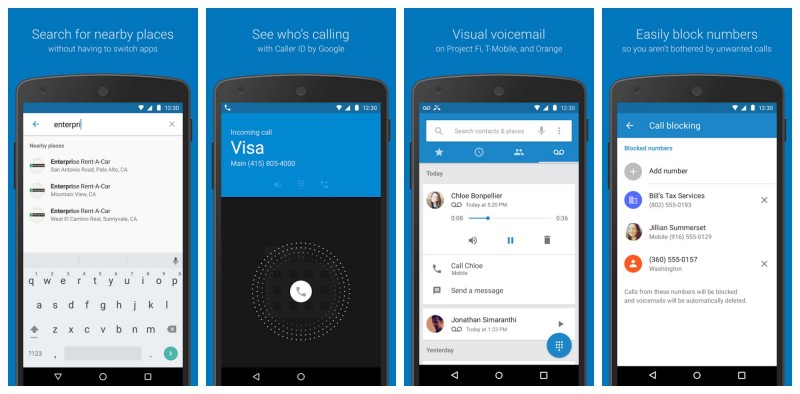
Here’s why you’d want to install it:

  • Caller ID – Know who’s calling before you pick up, with business names now visible on the call screen along with their number.
  • Call Blocking – Get the calls you want, and not the ones you don’t. You can now block numbers to prevent unwanted calls.
  • Visual Voicemail – Check your messages without having to call voicemail – view, playback and delete them right from the Phone app. Currently available for Project Fi, T-Mobile USA, and Orange France customers.
  • Nearby Places – No more switching apps or cumbersome copy and paste. Just find and call places right from the Phone search bar.

So, if you absolutely hate using whatever dialer app came out of the box on your smartphone, like most things on Android… you can change that. Whether you’re shooting for a Royal Flush of all-Google apps, or just prefer the functionality of the Google dialer, Phone by Google can be downloaded via the link down below.

Share:

Saturday, May 7, 2016

අවසාන දැනුම් දීමයි ආයේ කියන්නේ නෑ MICROSOFT NEWS


අවසාන දැනුම් දීමයි ආයේ කියන්නේ නෑ MICROSOFT NEWS ඔන්න කිව්වා ආයෙමත් ,, මේකයි කතාව ඔයාලා වින්ඩෝස් භාවිතා කරන කට්ටිය නම් දන්නවා ඇතිනේ වින් 10 එක අපිට දුන්නේ නොමිලේ කියලා ඒ කියන්නේ කලින් භාවිතා කල වින්ඩෝස් උඩින් මේක දා ගන්න අපිට නොමිලේ හම්බුනා. ඔන්න මේ මැයි ලබන කොටම මෙයාලා තීරණයක් අරං මේක ෆ්‍රී දෙන එක නතර කරන්න. 

Reminder: Windows 10 Free Upgrade Offer To End On July 29, Will Cost $119

මෙන්න කතාව අපිට ජුලි 29 වෙනකන් විතරයි මේක කරගන්න පුළුවන් එහෙම නොවුනොත් ඉතින් සල්ලි දීල ගන්න වෙයි. මෙන්න තවත් විස්තර.

Anyone who has been holding off upgrading to Windows 10 might want to rethink that decision fairly soon, with Microsoft now reminding the world that those who want to get their hands on a free upgrade will need to do so fairly sharpish. As the first birthday of Windows 10, and the accompanying Anniversary Update, draws ever closer, Microsoft is seeking to remind us all that July 29th will be the last possible date during which a free upgrade of Windows 10 will be available.


Microsoft’s decision to offer a free upgrade to Windows 10 was initially said to be valid for a year, and with Microsoft good to its word, July 29th is a day that those running older versions of Windows may wish to mark on their calendars. Things start to get expensive the day after that too, with Microsoft set to start asking for $119 in exchange for a fresh Windows 10 update key come July 30th.

In the video embedded below, Microsoft’s Bryan Roper discusses 10 reasons to upgrade to Windows 10 today. වින් 10 ගැන තවත් විස්තර මේ වීඩියොවෙන්...


Share:

අපේ ලිපි කෙලින්ම Email එකට

Enter your email address:

Delivered by FeedBurner


මුහුණ පොතේ අපි

පැමිණ ගිය අය

අපේ යාලුවෝ